0 ratings





Ürün #:
4555926
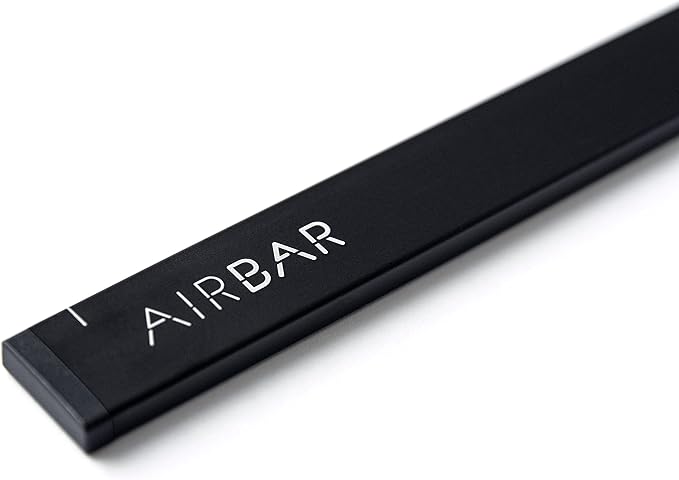
AirBar by Neonode - Add Touchscreen to 13.3" Windows 10 Notebooks
Ürün #:
4555926
Stokta yok
 USA mağazasından ithal edildi
Güvenli işlem
Ubuy, güvenliğiniz ve gizliliğiniz için yoğun çaba sarf etmektedir. Gelişmiş ödeme güvenlik sistemimiz, iletim sırasında bilgilerinizi AES (Gelişmiş Şifreleme Standartları) ve SSL (Güvenli Soket Katmanı) protokolleri kullanarak şifreleyerek gizliliği sağlar. Ödeme bilgileriniz, üçüncü taraf satıcılarla paylaşılmadığı için %100 güvende.
En İyi Lojistik Ortaklarımız


AirBar gives your non-touch Windows 10 notebook touchscreen functionalities.

Hızlı
Kargo

Ücretsiz
İade*

Güvenli Paketleme

%100 Orijinal Ürünler

PCI DSS Compliance

ISO 27001 Certified


Note: Step Down Voltage Transformer required for using electronics products of ABD store (110-120). Recommended power converters Şimdi Al.


Ürün Detayları
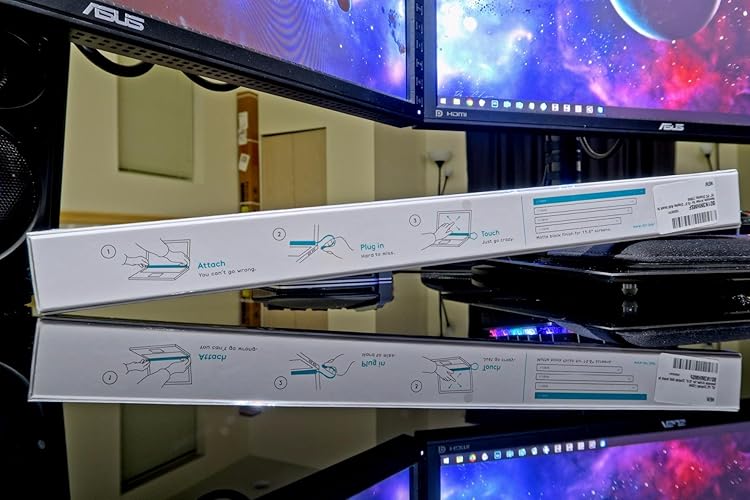
- Plug and Touch - Simply attach the AirBar with the included magnets to the bottom of your screen and plug in the USB cord
- Compatibility - AirBar works with most notebooks running Windows10 with 13.3" screen size
- Touch Using Any Object - Touch with a finger, glove, paintbrush, stylus and more
- Designed for Windows 10 Laptops
- Gestures: Tap, Swipe, Pinch, Zoom, and Rotate
- Note: Refer the Instructional Video before use.
| Color | Matt Black |
| Subject Character | American |
| Product Style | Win |
| Item Form | Bar |
| Pattern | Solid |
| Shape | Irregular |
| Item Dimensions | 325 x 5 x 17 inches (825.5 x 12.7 x 43.2 cm) |
| Number of Pieces | 1 |
| Unit Count | 1.0 Count |
| Number of Items | 1 |
| Size | 13.3" (33.8 cm) |
| Surface Recommendation | Window |
| Recommended Uses For Product | Laptop |
| Indoor Outdoor Usage | Indoor |
| Additional Features | Touchscreen |
| Reusability | Single Use |
| Brand Name | AirBar by Neonode |
| Target Audience | Adults |
| Global Trade Identification Number | 07350000980028 |
| Set Name | AirBar for 13.3" Windows 10 Notebooks |
| UPC | 853661007020 |
| Manufacturer Part Number | NNABC2950XU01 |
| Model Number | NNABC2950XU01 |
| Item Weight | 51 Grams |
| Item Type Name | Neonode 13.3" Windows 10 Laptops, Matt Black (NNABC2950XU01) |
| Manufacturer | Neonode |
| Age Range Description | Adult |
| Included Components | AirBar Touchscreen Sensor, Instructions and legal folder |
| Material Type | Neonode |
| Water Resistance Level | Not Water Resistant |
| Brand | AirBar-by-Neonode |
| Item dimensions L x W x H | 325 x 5 x 17 inches (825.5 x 12.7 x 43.2 cm) |
| Material | Neonode |
| Cartoon Character | American |
| Special Feature | Touchscreen |
| Style | Win |
| Package Weight | 3.61 Pound |
What's in the box
AirBar Touchscreen Sensor
Instructions and legal folder
ÜRÜN AÇIKLAMASI
Herhangi bir sorunuz mu var? Bizimle sohbet edin
Müşteri Soruları ve Cevapları
-
soru:
What is AirBar by Neonode and how does it work?
Cevap: AirBar by Neonode is an innovative device that turns your 13.3-inch Windows 10 notebook into a touchscreen-enabled device. It works by emitting an infrared light that creates a touch-sensitive area above your laptop screen. When you interact with the screen using your fingers or a stylus, the AirBar detects these movements and translates them into touch commands. This is particularly useful for users who want to enhance their work or gaming experience by using touch gestures, making applications feel more intuitive and responsive. -
soru:
Is AirBar compatible with all Windows 10 notebooks?
Cevap: AirBar is specifically designed to be compatible with select 13.3-inch Windows 10 notebooks. Before purchasing, it's essential to check the compatibility list provided by Neonode to ensure your device will work seamlessly with the AirBar. This compatibility focus ensures that users can effectively add touch capabilities without encountering any software or hardware issues. A successful installation can vastly improve your productivity and enjoyment of touch-supported applications, making everyday tasks like scrolling or zooming much easier. -
soru:
How do you install AirBar on a notebook?
Cevap: Installing AirBar is a straightforward process. Simply clean the bezel of your laptop, peel off the adhesive backing of the device, and align it with the bottom of the screen. Once securely attached, plug the USB connector into your laptop to allow it to recognize the device. The installation process can usually be completed within minutes, enabling users to start enjoying a touchscreen experience almost immediately. This kind of accessible installation allows individuals with minimal technical skills to convert their laptop into a modern touch-enabled device. -
soru:
Can I use gestures with AirBar?
Cevap: Yes, AirBar allows you to use a variety of touch gestures to interact with your Windows 10 notebook. You can swipe, tap, pinch to zoom, and scroll, just as you would with a traditional touchscreen device. This functionality makes multitasking smoother and enhances user interaction with applications like drawing or design software. For example, artists can use AirBar to create digital paintings by directly interacting with the screen, allowing for a much more tactile and engaging experience in creative applications. -
soru:
Does AirBar work with Windows 10 apps?
Cevap: Absolutely, AirBar is fully compatible with Windows 10 applications that support touch input. It enhances the usability of apps such as Microsoft Office Suite, web browsers, and media players, allowing you to interact more intuitively. For instance, you can navigate through photos, manipulate spreadsheets, or browse websites using touch-based gestures, making everyday tasks more accessible and enjoyable. This comprehensive support for touch-enabled interactions adds significant value to your productivity and leisure activities. -
soru:
What if AirBar doesn’t respond properly?
Cevap: If your AirBar doesn't respond as expected, start by ensuring that it's correctly installed and properly connected to your laptop. Check the USB connection and make sure your Windows 10 operating system is updated for optimal performance. Additionally, confirm that you are within the sensitivity range specified by the manufacturer. Often, repositioning or cleaning the screen can resolve minor sensitivity issues. Addressing these factors can significantly enhance your touchscreen experience, ensuring that AirBar performs as intended. -
soru:
Is there any software needed to use AirBar?
Cevap: AirBar does not require any additional software installation to function, making it a plug-and-play device. Once you attach the device and connect it to your laptop, Windows 10 will automatically recognize AirBar and provide the necessary drivers for operation. This simplicity means you can start using it right away without complex setups or configurations. Users can enjoy a seamless experience, transitioning their non-touch device into a fully functional touchscreen device in a matter of moments. -
soru:
Can I use my AirBar with multiple devices?
Cevap: AirBar can be used with multiple compatible 13.3-inch Windows 10 notebooks, but you will need to disconnect it from one device before connecting to another. This flexibility allows users to take advantage of the touchscreen feature across various devices, making it a versatile tool for professionals or students who frequently switch between laptops. Whether in a classroom setting or a collaborative project, having the ability to transition easily enhances productivity across different devices. -
soru:
How does AirBar enhance productivity?
Cevap: AirBar enhances productivity by providing a more interactive way to work with your Windows 10 laptop. With its touchscreen capabilities, users can navigate files, make presentations, and draw diagrams with ease, using simple gestures. The functionality allows for quicker access to applications and improved multitasking. For example, educators can use it to effortlessly switch between apps while teaching, and remote workers can manage tasks more fluidly. The added ease of touch interactions can significantly streamline workflows. -
soru:
Where can I buy AirBar by Neonode?
Cevap: You can buy AirBar by Neonode from Ubuy in Turkey. Ubuy offers a convenient online shopping experience with reliable service, making it easy to add touchscreen capabilities to your 13.3-inch Windows 10 notebook. Browse their website to explore availability and make your purchase, enhancing your device with cutting-edge technology tailored for your needs.
AirBar by Neonode Replacement Screens NNABC2950XU01 Editorial Review




Editör incelemesi bulunamadı
Müşteri Yorumları ve Puanları
1044 müşteri puanları
-
5 Star
51%
-
4 Star
17%
-
3 Star
10%
-
2 Star
7%
-
1 Star
15%
Bu ürünü değerlendirin
Düşüncelerinizi diğer müşterilerle paylaşın
Platform Trust & Buyer Confidence

MT
Mohd
Verified buyer
“The product received very good packaging & safe…Thank You”
16 June 2026 · via Trustpilot
SJ
Shawati
Verified buyer
“Accurate delivery timing given”
16 June 2026 · via Trustpilot
YB
Youcef
Verified buyer
“Not madly expensive like I thought, and much quicker than promised.”
15 June 2026 · via Trustpilot
LM
Leila
Verified buyer
“Never dealt with Ubuy before, but everything worked out great. Seamless cross border purchasing and shipping. Thanks!”
6/7/2026 · via Trustpilot
KA
Kwame
Verified buyer
“The process was smooth, with clear communication and timelines. This was my 1st purchase and I am really impressed. I will definitely be coming back.”
12 June 2026 · via Trustpilot
Güvenli Ödeme
Global Delivery
Kolay İade
Genuine Products
Ürün Fiyat Geçmişi
Önemli bilgi
- Sınırlamalar : Uluslararası olarak gönderilen ürünler için, üretici garantisinin geçerli olmayabileceğini lütfen unutmayın; üretici servis seçenekleri mevcut olmayabilir; ürün kılavuzları, talimatlar ve güvenlik uyarıları hedef ülke dillerinde olmayabilir; ürünler (ve beraberindeki malzemeler) varış ülkesi standartlarına, spesifikasyonlarına ve etiketleme gerekliliklerine uygun olarak tasarlanmayabilir; ve ürünler hedef ülke voltajına ve diğer elektrik standartlarına uygun olmayabilir (uygunsa bir adaptör veya dönüştürücü kullanılmasını gerektirir). Alıcı, ürünün yasal olarak hedef ülkeye ithal edilebildiğinden emin olmaktan sorumludur. Ubuy veya bağlı kuruluşlarından sipariş verirken, alıcı kayıtlı ithalatçıdır ve varış ülkesinin tüm yasa ve düzenlemelerine uymalıdır.
- Ubuy küresel bir arama motoru olduğundan, Ubuy'da listelenen tüm ürünler satılık değildir. Ürünler ihracat/ticaret düzenlemelerine tabidir.
Şu anda stokta yok.
Bu ürünün tekrar stokta olup olmayacağıını veya ne zaman olacağını bilmiyoruz.
Bu ürün ülkemde kısıtlı değil. (Bu ürün ülkenizde kısıtlı değilse lütfen yukarıdaki bağlantıya tıklayın, böylece ekibimiz inceleyecek ve izin verecektir).
Güvenli işlem
PCI DSS compliant and ISO 27001:2022 certified, with encrypted payments and full buyer protection on every order.
En İyi Lojistik Ortaklarımız
En hızlı sınır ötesi teslimat
Özellikler ve Faydalar
- AirBar turns non-touch Windows 10 laptops into touchscreen devices
- Easy to install and use with plug-and-touch feature
- Increases productivity and makes laptop usage more fun
- Works with most notebooks running Windows 10 with screen sizes of 13.3, 14, and 15.6
- Can be used with a finger, glove, paintbrush, stylus, and more
- Gestures include tap, swipe, pinch, zoom, and rotate
Ubuy Assurance
Experience worry-free shopping with 100% original products, PCI DSS-compliant payment security, ISO 27001-certified data protection, the fastest cross-border delivery, free returns *, and secure packaging on every order.